In the app
Review files before preparing a clean copy
Use the originals list to check which PDF you are preparing, then open the file or its menu when pages need cleanup. Make page changes before choosing a size target or generating the clean copy.
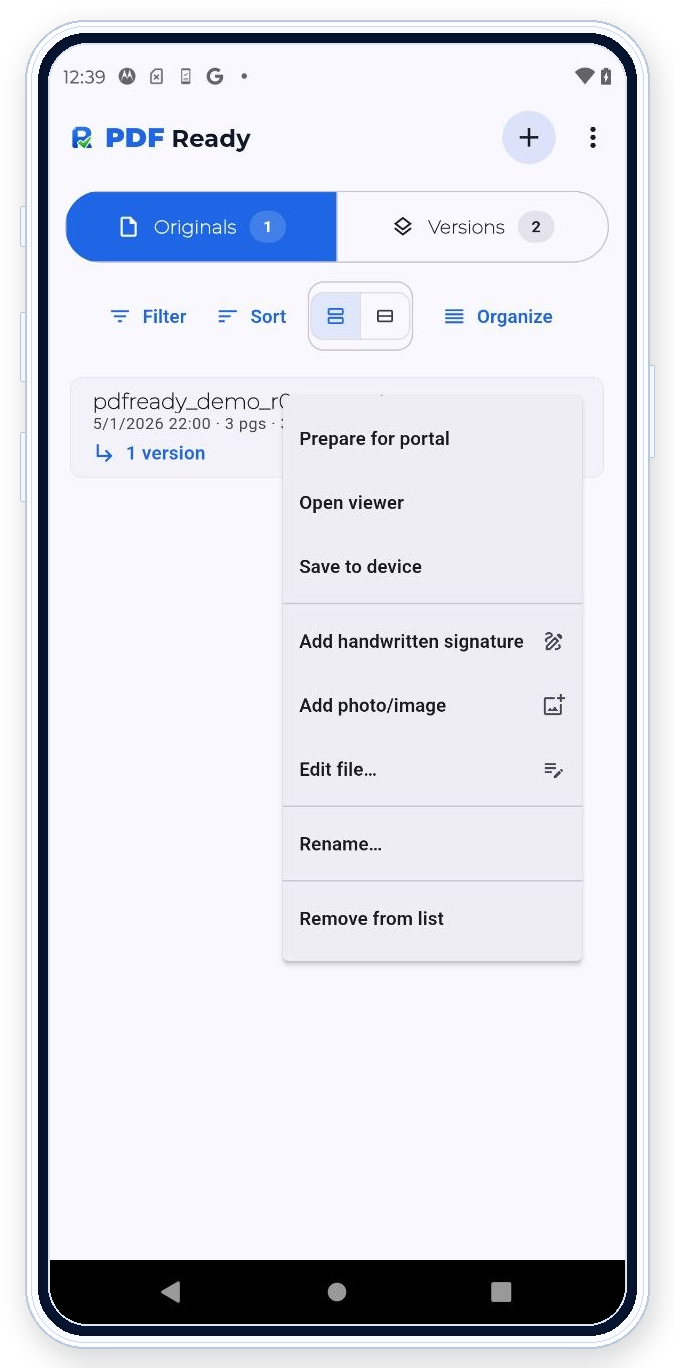

PDF Ready helps you keep the upload focused by reviewing pages before export. Remove extra pages, rotate or reorder where supported, and prepare the document you were actually asked to provide.
In the app
Use the originals list to check which PDF you are preparing, then open the file or its menu when pages need cleanup. Make page changes before choosing a size target or generating the clean copy.
What this helps with
Use page editing when a PDF contains extra pages, pages in the wrong order, sideways scans, or supporting pages that should not be in the final upload.
Workflow
After scanning, importing, adding photos, or merging files, review the page set. Make page-level changes before choosing size targets or exporting the clean copy.
Review
Check that the final page order is correct, every required page is present, and no unrelated page remains. A clean upload file should stay focused on the requested document.
Boundary
PDF Ready is for page-level preparation before upload, not for rewriting any text, form field, or embedded PDF content.
Portal requirements
PDF Ready prepares around known checks such as size, pages, readability, restrictions, active content, and requested options. If the portal shows an error the app can help resolve, you can adjust and generate another clean copy.
Related features
Use Scan or import before page review. Use Merge files if several PDFs need to become one file. Use Review before export after page changes.