In the app
Turn on PDF/A-2b from More options
In the Prepare screen, choose GENERAL, IRCC, or CEAC and the size limit first. Just below the size selector, expand More options and turn on Try PDF/A-2b when the portal or reviewer asks for that format.
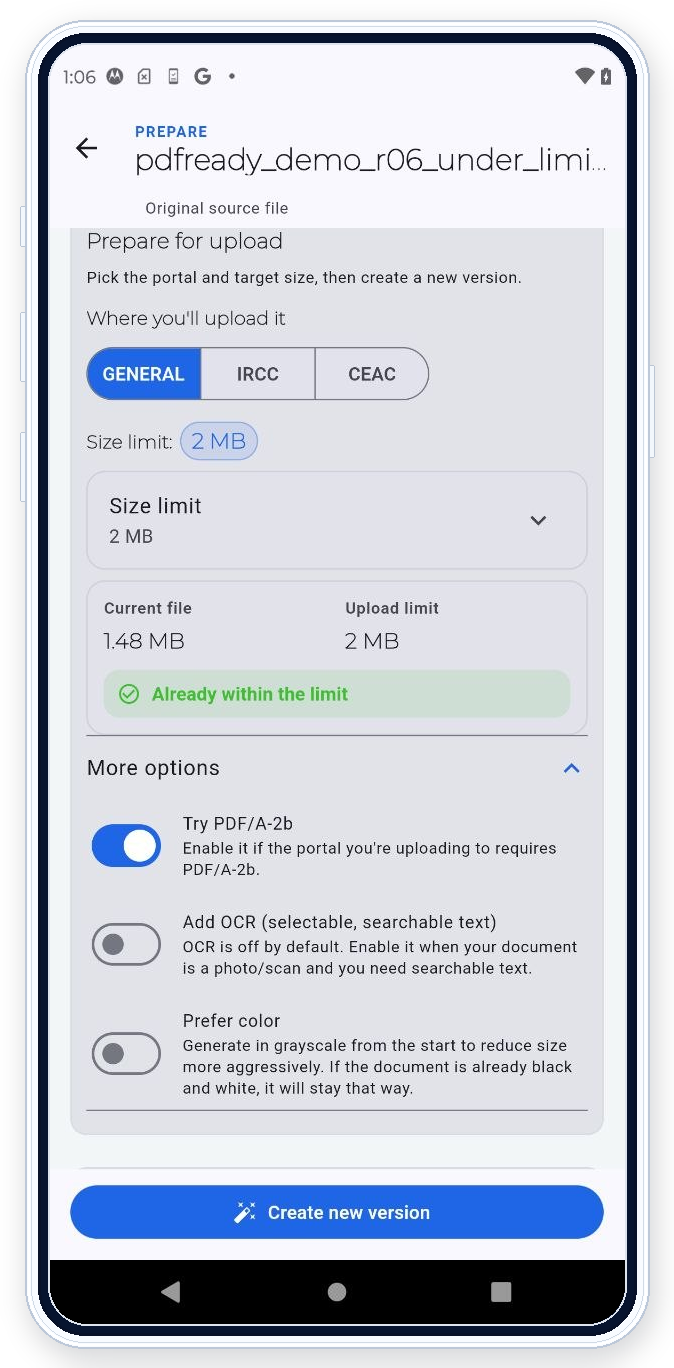

PDF Ready can prepare PDF/A-2b when a portal, reviewer, or workflow asks for that format. PDF/A-2b can affect size, so review warnings, page readability, and final file size before clean export.
In the app
In the Prepare screen, choose GENERAL, IRCC, or CEAC and the size limit first. Just below the size selector, expand More options and turn on Try PDF/A-2b when the portal or reviewer asks for that format.
What this helps with
Use PDF/A-2b when the destination workflow, reviewer, or instructions ask for it. The feature helps align the output with that format request before you export the clean copy.
Workflow
Start from the source PDF, choose the preparation path that matches the destination, and apply PDF/A-2b when that format is part of the requirement. Then review the prepared file before export.
Review
Check page count, final size, warnings, and readability. PDF/A-2b may change the file structure and can increase size, so use exact size targets again if the destination also gives a size limit.
Requirement handling
PDF Ready prepares the file for PDF/A-2b when that option matches the destination instructions. It also lets you review related checks such as size, pages, restrictions, active content, readability, and OCR when needed. If the portal gives an error the app can help resolve, you can adjust and generate another clean copy.
Practical limit
Use PDF/A-2b for workflows that ask for it. A destination may still reject a file for size, missing pages, unreadable scans, form requirements, or other checks outside the format choice.
Related features
Use Exact size targets if PDF/A-2b changes file size. Use Review before export before creating the clean copy. More context: PDF/A-2b guide and private PDF prep without upload.